Infographics for Local SEO and AI Discovery: The Definitive Guide to Getting Found Everywhere
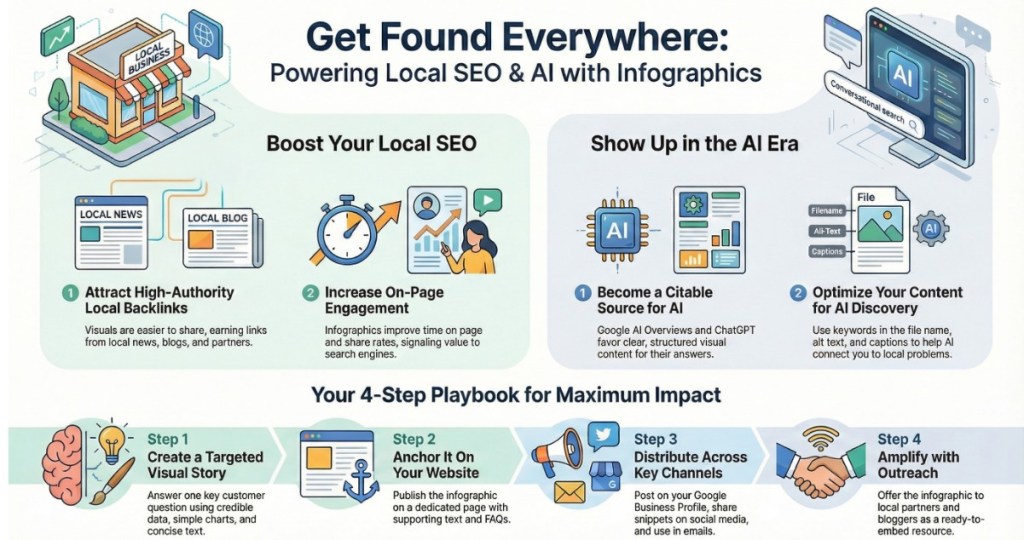
Infographics are visual stories built from data and keywords that attract backlinks, increase engagement, and help your business surface in Google Search, AI Overviews, ChatGPT answers, and local map results when deployed strategically across your website, Google Business Profile, and social channels.aiprm+2
What Are Infographics
Infographics are structured visual representations of information that turn complex ideas into clear, memorable, and shareable stories for your audience.strikingly+2
A deeper look at infographics
An effective infographic blends concise copy, clean design, and credible data into a single image that can be understood in seconds. It relies on hierarchy, color, and simple charts to guide the eye, making the information easier to recall and more likely to be shared, linked, and referenced by both people and AI systems.97thfloor+3
Why Infographics Matter for Local SEO
Infographics earn natural backlinks from blogs, news sites, and local partners who prefer sharing a visual asset over a plain article, which strengthens your domain and local authority. When those backlinks come from businesses and publishers in your city or service area, they reinforce your relevance for local queries and help you appear more often in the local pack and map results.venngage+1
Infographics also increase on-page engagement—time on page, scroll depth, and share rates—which are powerful behavioral signals that search engines use to identify content that deserves higher placement. Paired with long‑tail local keywords such as “water damage restoration infographic in Hagerstown” or “Frederick MD driveway paving process visual guide,” they create highly targeted entry points for ready‑to‑buy visitors.aiprm+1
How Infographics Help You Show Up in AI
Google’s AI Overview, ChatGPT, and other LLMs look for authoritative pages that combine clear structure, descriptive alt text, and consistent topical relevance. When your infographic lives on a well‑optimized page—H1, schema, captions, and surrounding FAQ copy—AI systems can interpret both the image and the context, making your brand more likely to be cited as a source.aicontentfy+1
If you embed long‑tail keywords into the file name, alt text, caption, and nearby headings (for example, “emergency plumber leak detection infographic for Baltimore homeowners”), AI models are more able to associate your business with that specific problem and location. As AI tools summarize information, your visual asset becomes a magnet: a single infographic can fuel answers across search, chatbots, and recommendation systems.aicontentfy+1
Case Study: How One Local Business Grew with Infographics
A regional service company seeking more local traffic created a data‑driven infographic explaining the cost, timeline, and benefits of its core service, then published it on a dedicated landing page optimized for city‑specific keywords and FAQs. The team repurposed this infographic into Google Business Profile posts, social snippets, and email content, always linking back to the main page.venngage+1
Within weeks, the asset attracted multiple local backlinks from partners, a chamber of commerce, and niche blogs that preferred sharing a visual over writing their own article. As those links accumulated, the site’s local rankings improved, organic traffic grew significantly, and Google Business Profile actions—calls, direction requests, and website clicks—saw double‑digit percentage increases, echoing outcomes reported in documented local SEO and infographic case studies.clockworkwd+1
How to Create an Infographic (Manually and with AI)
To create a traditional infographic, you start by defining a single question your audience cares about—such as “What does water damage restoration really cost in my city?”—then gather a small set of credible statistics, process steps, and local insights. From there, you map a simple narrative flow (problem → stakes → solution → proof) and translate it into charts, icons, and short text blocks using tools like Canva, Venngage, or Adobe Express.pmc.ncbi.nlm.nih+3
AI‑assisted workflows add speed: tools powered by models like ChatGPT can help outline the story, draft copy, and even suggest layouts or data groupings based on your service area and ideal customer. You can prompt an LLM with your niche, location, and target keywords, then refine the generated structure before handing it to a designer or a DIY template‑based builder.aicontentfy+1
Where to Use Infographics for Maximum Impact
Infographics belong first on your own domain, anchored in a pillar blog post or service page that uses schema markup, FAQs, and contextual copy to support the visual. This central location becomes the URL that AI systems, journalists, and partners can reference and link to.97thfloor+1
From there, you can:
- Add the infographic to your Google Business Profile photos and use it in regular posts with locally focused captions and calls to action.clockworkwd+1
- Share cropped panels of the infographic on social platforms, always inviting users back to the full version on your site.
- Include the visual in outreach campaigns to local bloggers, directories, and associations as a ready‑to‑embed resource that naturally earns backlinks.venngage
Each placement strengthens the association between your brand, your location, and your expertise in the topic, which is exactly what search engines and AI systems reward.
Using Infographics to Support Google AI Overview and ChatGPT
Google’s AI Overview favors pages that provide concise, structured answers with supporting visuals that clarify key points. By aligning your infographic with common question formats (“how,” “what,” and “cost” queries) and pairing it with clean headings and FAQs, you increase your chances of being incorporated into those synthesized responses.97thfloor+1
ChatGPT and similar tools draw heavily from well‑organized, authoritative content that has been shared and referenced across the web. When your infographic becomes the most comprehensive visual explanation of a local problem—supported by trustworthy data and clear attributions—it stands as a natural candidate for the kind of information AI systems echo back to users.visualcapitalist+1
Recommended Authoritative Resources
For deeper technical guidance and inspiration, these resources reinforce and expand the ideas in this blog:
- A practical overview of how infographics enhance engagement and SEO, including AI‑assisted creation workflows.aiprm
- A detailed breakdown of what makes a high‑quality infographic—from data selection to visual hierarchy and distribution strategy.97thfloor
- A case study on using infographics specifically to earn local backlinks and improve local SEO performance.venngage
10 sources
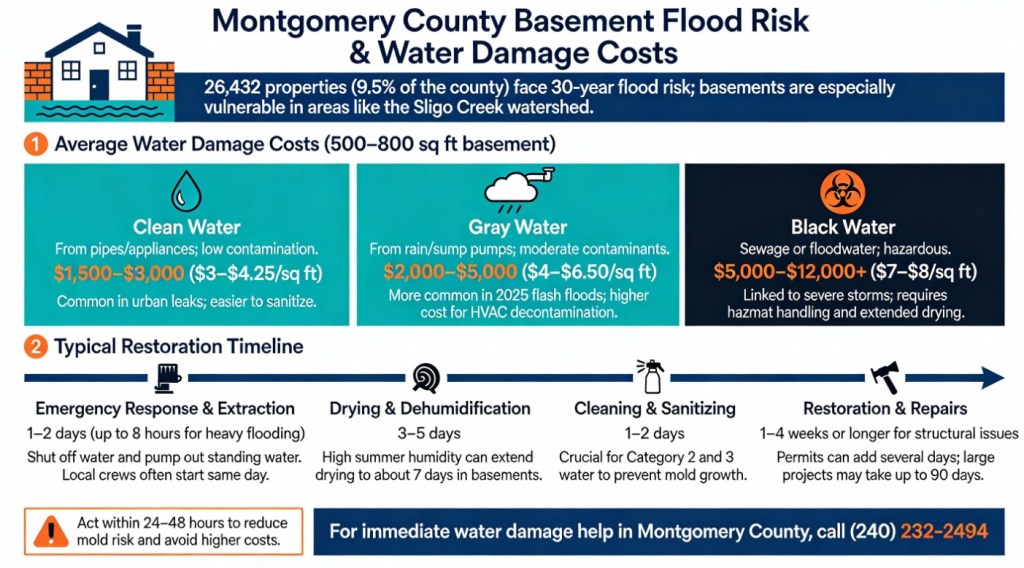
Great example of a simple Infographic:
 Mid Atlantic BLOG
Leave a comment